CPR Functions
CPR Functions Overview
What is a State?
A State in CPR represents a user session in a journey. It contains the state of the user's progress (Module Execution Order, Module Variables etc.) and is stored in HyperVerge's backend to enable resumption of the journey at any point.
What is Unique ID?
A Unique ID is used to store and retrieve user journey state in the Cross-Platform Resume (CPR) system. The journey state is stored against userId (transactionId) and uniqueId in HV backend.
The UniqueId can also be embedded inside the Auth Token and this token is generated by the Generate Auth Token API.
It is also used to trigger user authentication. If uniqueId is NOT embedded in Auth token (when authenticateOnResume is set as 'no' in generate-auth-api), the user is required to do mobile/email authentication before they can continue their journey.
What is User Authentication?
User authentication is the process of verifying the identity of a user. This verification happens when the user drops off and comes back to resume the onboarding journey. Authentication ensures that only the rightful owner of a session can resume their journey. A user can authenticate themselves using:
- Mobile OTP
- Email OTP
How CPR Works
There are three major APIs involved in CPR:
-
Generate CPR Auth API — This API generates an auth token for a specific transaction, workflow, and application. The client calls this API in their backend to generate an auth token and then passes it to the SDK. Based on the value of
authenticateOnResume:- If
'yes': uniqueId is NOT embedded in the auth token → user is asked for mobile/email authentication - If
'no': uniqueId is embedded in the auth token → user resumes without authentication
- If
-
Put Transaction API — Called after each step in the onboarding journey to store the user's journey state in the backend. Data saved includes module execution order, module details (e.g., module variables), etc.
-
Get Transaction API — Called at the start of the onboarding journey (after SDK initialization) to check if the user has previous journey state stored in the backend. If data exists, it returns the last saved state and allows the user to resume.
Unique Id
Why was Unique ID introduced?
Storing session data directly against a Transaction ID poses security risks. If a client's Transaction ID generation logic is predictable, an attacker could potentially guess valid Transaction IDs of other users and pass it to the GET Transaction API to fetch PII of other users.
Where is Unique ID Required?
- Saving User Journey Data: The journey state is stored against userId (transactionId) and uniqueId in HV backend.
- Fetching User Journey Data: When a user resumes onboarding, the SDK sends the uniqueId in the request to retrieve the stored session state.
- If CPR Auth is enabled and auth token (with uniqueId embedded) is not sent to the SDK, then the user has to go through the Auth flow to verify their identity.
How is Unique ID Generated?
It can be generated in two different ways:
- The client calls the
generate-auth-tokenAPI withauthenticateOnResumeas'no'which generates an auth token with uniqueId embedded. - At the end of the mini auth flow, Thomas API calls HV backend to generate the uniqueId and returns the same to the SDK.
Handling LocalPaths and Base64 strings
Why convert to URLs
Problem:
- SDK uses local paths like
file:///Users/JohnDoe/Documents/image.jpgwhich are system-dependent and get stored when saving the user's state. However, the local path would not be relevant when user resumes on a different device. - Storing Base64 strings in a database increases storage costs while causing performance degradation.
Solution:
- URLs solve these problems as they can be stored in DB easily and can be accessed from any device where the user resumes.
When configuring workflows, ensure URLs are used everywhere:
Configure in Builder
Enable "Return Input Image URLs" in module config of builder.
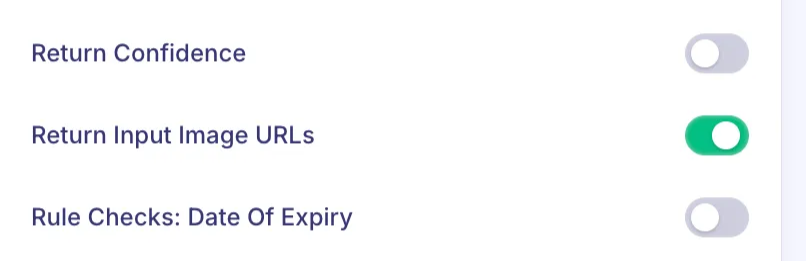
Then, use the "Selfie Image URL (S3)" / "ID Front Image URL (S3)" variables of the modules in the workflow.
For other APIs/Modules, check if base64 strings / local paths are being used and replace/convert those into URLs.
Sample Config
Include returnInputImageUrls to return the URL of input images in below APIs:
- Image URL path in API Response:
- Selfie Validation:
response.result.inputImageUrls.image - ID Card Validation:
<front/back>.response.result.inputImageUrls.image
- Selfie Validation:
- For other APIs, check manually if base64 strings / local paths are being used and replace/convert those into URLs.
expiresAfter
What is expiresAfter and what is it used for?
The expiresAfter key is used to define the time duration (in minutes) after which a module's stored data becomes invalid.
If a user has completed a particular module (with expiry N minutes) and does not complete the journey within N minutes, the module state is considered expired, and the user has to redo that step. This ensures that time-sensitive data remains fresh.
If one or more variables of the module have an expiry duration, the minimum of the expiry timestamps is considered.
Use Case Example
Consider a scenario where a user must complete video KYC within 72 hours of completing Digilocker verification:
- Set
expiresAfterin the Digilocker module with a value of 4320 minutes (72 hours) - If the user returns within 72 hours → resume directly from Video KYC
- If the user returns after 72 hours → must redo the Digilocker step
S3 URLs from HyperVerge's S3 buckets can be refreshed when the state is returned. Therefore, the expiry field should not be added to the workflow config for these variables.
Sample Config
Value of expiresAfter is in minutes:
{
    "type": "Module Type",
    "subType": "Module Subtype",
    "id": "Module ID",
    "nextStep": "...",
    "properties": {
        "expiresAfter": "300"
    }
}
Transaction Expiry
How is Transaction Expiry Calculated?
transactionCreationTime + N
Where:
transactionCreationTimeis the time when the transaction was first created or refreshedN(dataRetentionDays) is the data retention period configured for a particular appId in the HV central config bucket. Default period is 14 days.
When is transactionCreationTime set?
A transaction's creation time is set when one of these events occurs:
- Initial Transaction Creation: User starts their onboarding journey for the first time
- Transaction Refresh: Transaction already exists but is refreshed due to certain conditions
- Recreation After Expiry: Transaction expired and was deleted, user resumes later → new transaction created
Why is Transaction Expiry Important?
- Data Management: Ensures old and irrelevant transaction data does not remain stored indefinitely
- Security & Compliance: Helps manage data retention policies in alignment with client requirements and privacy regulations
exitOnEndStates
What is exitOnEndStates?
exitOnEndStates allows clients to control whether a user can restart their journey after reaching specific end states. The following statuses can be configured:
auto_approvedauto_declinedneeds_review
How it works
- If
"auto_declined"is inexitOnEndStatesand the user reaches that state and tries to resume, the state is not refreshed. - If
exitOnEndStatesis not configured, reaching an end state refreshes the transaction (user restarts from the beginning).
When is State Still Refreshed?
Even with exitOnEndStates enabled, the state is refreshed if:
- User inputs have changed
- Workflow structure has changed (
workflowHashmismatch) - Transaction has expired
Sample Config
{
    "properties": {
        "serverSideResume": {
            "enable": true,
            "exitOnEndStates": [
              "auto_approved",
              "needs_review"
            ]
        }
    }
}
Possible values: "auto_approved", "auto_declined", "needs_review", "manually_approved", "manually_declined"
State Refresh
What is State Refresh?
State refresh is the process where the existing transaction state is deleted and a new empty state is created. This happens when the previously stored data is no longer valid or the transaction has expired.
When Does State Refresh Happen?
A state refresh occurs when the get-transaction-state API is called and one of these conditions is met:
- Transaction has expired
- Workflow hash mismatch — the workflow config has changed
- Input mismatch — the inputs provided to the SDK have changed
- Transaction has reached an end state (
auto_approved,auto_declined,needs_review)
Special Cases:
- If
resumeFromis enabled and the status isauto_declined, the transaction is not refreshed - If
exitOnEndStatesis configured for the reached status, the transaction is not refreshed
resumeFrom
What is resumeFrom?
resumeFrom allows users to resume their journey from a specific step instead of restarting when they reach an auto_declined end state. If configured inside if_false_configs or if_true_configs in a condition module, the system will resume from the specified step.
Sample Config
"condition_8GO1nu": {
    "rule": "module_id_validation.front_action == 'pass'",
    "if_true": "nextModule",
    "if_false": "decline",
    "name": "ID card OCR successful",
    "ifFalseConfigs": {
        "resumeFrom": "module_id_validation"
    }
}
Skip CPR Put
The skipCPRPut property skips the CPR PUT call from happening after a module is executed.
Example: The signature super module has 3 modules (Capture, Confirmation form, Upload API). All three have skipCPRPut set to yes. If a user drops off on any of these, they will resume from the beginning of the capture module.
This is useful in super modules where a user dropped off in the middle and should restart from the beginning of the super module (e.g., Digilocker, Wet Signature Module).
Dashboard State Reset
See CPR State Reset documentation.
CPR Auth
- Demo Video
- User flow diagrams (Miro) for different cases in CPR Auth
How is User Authentication done during the journey?
- The CPR Auth solution treats the authentication flow as a mini workflow inside the main workflow
- Mini Auth flow can be a combination of modules, conditions & conditional variables
- The Auth Flow ends when
nextStep: resumeCPR - If authentication is required, the SDK executes the mini auth flow. If not, it executes the main flow
Important Points
- CPR Auth flow is only supported if webcore is enabled
- User will have unlimited retries to perform authentication if they fail
- There is no resume for auth flow — if user drops off during auth, they restart auth from the beginning
Prevent Parallel Sessions
This feature ensures users cannot engage in multiple sessions concurrently, maintaining data consistency.
Example Scenario:
- User initiates Session A and completes a step
- Without completing Session A, user initiates Session B
- Session B becomes the active session
- If the user attempts to continue Session A, the system returns a session conflict error
Sample Config
"serverSideResume": {
    "enable": true,
    "version": 2,
    "preventParallelSessions": true,
    "exitOnEndStates": ["auto_approved", "needs_review"]
}
SDK Callbacks
session_conflict:
{
  "status": "error",
  "errorMessage": "session_conflict",
  "errorCode": "151",
  "details": {},
  "transactionId": "<transactionId>"
}
Session Validation Failed:
{
  "status": "error",
  "errorMessage": "Session Validation Failed",
  "errorCode": "151",
  "details": {},
  "transactionId": "<transactionId>"
}
state_not_found:
{
  "status": "error",
  "errorMessage": "state_not_found",
  "errorCode": "151",
  "details": {},
  "transactionId": "<transactionId>"
}
ignoredStateRefreshInputKeys
This feature ensures that state does not get reset when specific inputs are changed.
How to enable this
Add the key ignoredStateRefreshInputKeys under properties.serverSideResume in the workflow. The value is an array of input key names that should not trigger a state refresh.
{
  "serverSideResume": {
    "ignoredStateRefreshInputKeys": ["userType", "timestamp"]
  }
}
In this example, if userType or timestamp changes when SDK invokes these, CPR would not refresh the state.
Workflow Versioning
This feature helps avoid application reset when a workflow update is made.
- Workflow versions represent historical or updated iterations of a workflow
- The notation
1.0.0(MAJOR.MINOR.PATCH) denotes the severity of the change
InfoSec
Data Locality Compliance
Currently, PII data is stored only in the India region.
Data Storage and Encryption Policies
- PII data is encrypted at rest using Field Level Encryption at the database level
- This encryption is in addition to AWS's standard Encryption at Rest policies