Webcore
Overview
WebCore is a feature designed to ensure UI and functional consistency across Android, iOS, and Web SDKs. This is achieved by using a common logic and UI layer across all SDKs.
Previously, business logic and UI were maintained separately across platforms, requiring platform-specific updates. To simplify this, we centralized business logic and UI on the web platform, leveraging WebView to seamlessly integrate it across platforms.
Currently integrated into WebCore: form, API, and webView modules. Still native: modules requiring hardware interactions (camera, NFC) remain native for optimal performance.
Prerequisites
- Basic understanding of HyperVerge SDKs
- Knowledge of WebView basics
- Access to HV Central Config repository
Purpose & Use Case
WebCore resolves:
- UI inconsistencies across Android, iOS, and WebSDK
- Workflow behavior differences when workflows behave differently across platforms (e.g., conditions executing differently)
exitOnEndStatesPropertyconsistency across all platforms- Server Side Resume (CPR) issues on Android and iOS SDKs
Setting Up
How to Enable WebCore
Add the remote configuration against the appID at this path in hv-central-config.
Recommended WebCore Versions
| Android SDK | iOS SDK | Supported WebCore | Default WebCore |
|---|---|---|---|
| 0.30.* | 0.30.* | 8.10.* | Android: 9.0.0-alpha / iOS: 9.0.0-alpha |
| 0.31.* | 0.31.* | 8.10.* | Android: 9.0.0-alpha / iOS: 9.0.0-alpha |
| 0.32.* - 0.34.* | 0.32.* - 0.34.* | 8.10.* | Android: 8.10.1 / iOS: 8.10.1 |
| 0.35.* - 0.37.* | 0.35.* - 0.37.* | 8.11., 8.12., 8.13.* | Android: 8.11.0 / iOS: 8.11.0 |
| 0.38.* | 0.38.* | 8.13.* | Android: 8.11.0 / iOS: 8.11.0 |
| 0.39.* | 0.39.* | 8.14.* | Android: 8.14.0 / iOS: 8.14.0 |
| 0.40.* | 0.40.* | 8.14.* | Android: 8.14.2 / iOS: 8.14.2 |
| 0.40.1-2 | 0.40.1 | 9.1.0, 9.2.0 | Android: 9.1.0 / iOS: 9.1.0 |
| 0.41.0 | 0.41.0 | 9.2.1 | Android: 9.2.1 / iOS: 9.1.0 |
| 0.43.0, 0.44.0 | 0.43.0, 0.44.0 | 9.3.0, 9.3.1 | Android: 9.3.0 / iOS: 9.3.0 |
| 0.45.0 | 0.45.0 | 9.4.0 | Android: 9.4.0 / iOS: 9.4.0 |
| 0.45.1-3 | 0.45.2 | 9.4.1, 9.5.0, 9.6.0 | Android: 9.4.1 / iOS: 9.4.1 |
| 0.46.0 | 0.46.0 | ≥ 9.7.0 | Android: 9.7.0 / iOS: 9.7.0 |
| 0.47.0, 0.47.4 | 0.47.0 | ≥ 9.9.0 | Android: 9.9.0 / iOS: 9.7.0 |
| 1.0.0 - 1.0.2 | — | ≥ 9.9.0 | Android: 9.9.0 |
| 1.1.0 | — | ≥ 9.9.0 | Android: 9.15.1 |
| 2.0.0, 2.0.1 | — | ≥ 9.9.0 | Android: 9.15.1 |
Sample WebCore Configuration
{
  "webCore": {
    "enable": true,
    "version": "9.0.0",
    "override": {
      "android": {
        "0.31.1": {
          "enable": false
        },
        "0.30.2": {
          "enable": true,
          "version": "9.1.0"
        }
      },
      "ios": {
        "0.31.2": {
          "enable": true
        }
      }
    }
  }
}
JSON Structure:
webCore.enable— whether WebCore is enabledwebCore.version— default WebSDK versionwebCore.override— platform-specific overrides- Android/iOS keys with SDK version keys inside
- Each can have its own
enableandversion
Important Considerations
- WebCore has preference over WebForm — all forms are loaded from webSDK in a webView regardless of the
useWebFormproperty - Ensure WebCore version is compatible with the corresponding SDK version
There was an issue where having different webCore versions for different SDK versions is not possible. Android SDK version-specific overrides will cause a crash on these versions.
Benefits of WebCore
- Eliminates logic duplication across Android, iOS, and Web
- Ensures consistent behaviour across platforms
- Leverages the full power of a single platform (Web)
- Reduces development effort and simplifies maintenance
Setting Custom Fonts
WebCore allows custom fonts via font stylesheet URLs in the UI configuration.
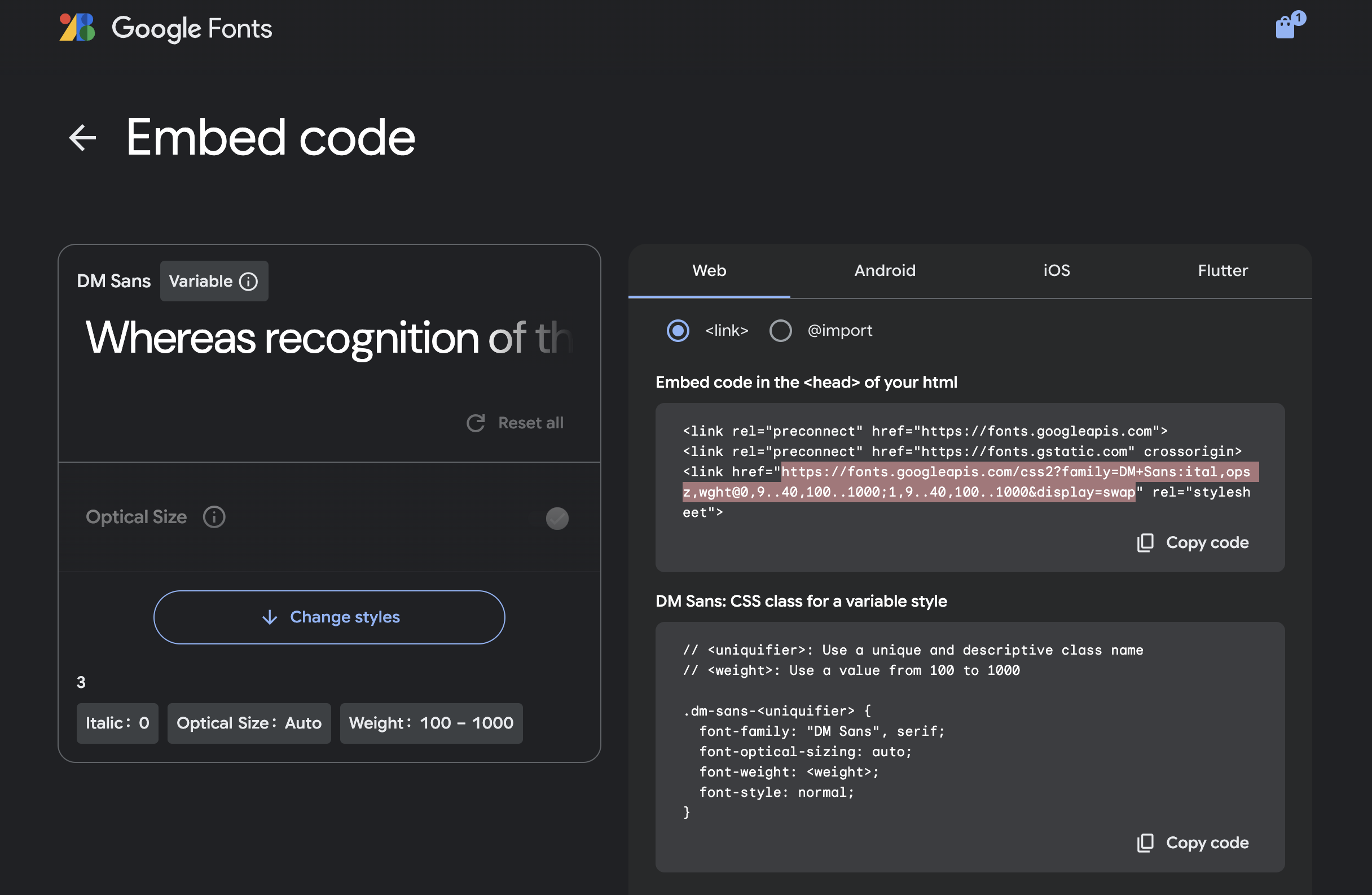
How it works:
- Top-level property
customFontStylesheetUrlsstores the list of font stylesheet URLs - Fonts are fetched dynamically and applied to WebCore modules
Example UI config:
{
  "customFontStylesheetUrls": [
    "https://fonts.googleapis.com/css2?family=Roboto:ital,wght@0,100..900;1,100..900&display=swap",
    "https://fonts.googleapis.com/css2?family=Montserrat:ital,wght@0,100..900;1,100..900&display=swap"
  ],
  "font": {
    "titleTextFont": "Roboto",
    "statusTextFont": "Montserrat"
  }
}
This applies only for WebSDK and WebCore. If mobileSDK uses WebCore:
- Only webCore modules (Forms, country picker, API modules) load fonts from
customFontStylesheetUrls - For native modules (doc, face), you still need to add font files in the app's asset folder
Debugging
Using Kibana
Identify if WebCore is being used
Check if req.headers.madefrom property is webCore.
Identify the WebSDK version used in WebCore
req.headers.sdk-version— Mobile SDK versionreq.headers.sdkversion— Web SDK version
Using ADB (Android)
Inspecting WebSDK in WebCore mode
Requirements:
- Debug Android APK (release APK cannot be debugged)
- Chrome/Brave browser on PC
- USB debugging enabled on Android device
See Chrome remote debugging docs for detailed steps.
Note: You can only inspect WebSDK-related things, not native modules (doc, face, NFC) or analytics API calls.
Debugging native modules
Follow the same procedure as debugging mobile SDKs without WebCore:
- Using Hunter app
- Demo/sample application
- Kibana and Metabase
Using Sentry
- Android Sentry project — for crashes from native Android SDK
- WebSDK-webCoreMode Sentry — for crashes from Web SDK
- If uncertain, check both with the transactionID filter
Common Issues
UI issues on any screen
Why Firefox specifically? Firefox behaves similarly to Android WebView for rendering. We were able to replicate almost all UI issues in mobile Firefox but not Chrome.
- Android: Try to replicate on Firefox browser → if not replicable, raise to mobileSDK team; if replicable, raise to webSDK team
- iOS: Try to replicate on Safari browser → same logic
Workflow crashing on WebCore but not on non-WebCore mode
Narrow down to the specific module using standard debugging methods (Hunter, Kibana, Metabase, or direct replication) and raise a query to the corresponding team.
SDK response not sent to parent app correctly
- Check Results API response to verify user details
- If wrong → raise to webSDK team
- If correct → raise to mobileSDK team
Security & Miscellaneous
Security
- Activities are not exported
- WebView is non-debuggable in release mode
- Application-level WebView security depends on client enforcement
Base64 vs S3 URLs
- WebSDK uses base64 for storing files
- Base64 strings are ~33% larger than the actual file
- Storing large base64s causes out-of-memory errors in native SDKs
- Ideal solution: use S3 URLs instead of base64
Analytics
- Step-wise analytics enabled
- All WebSDK HyperKYC events sent in webCore mode
- API calls include header
made-from = "webCore"
Sentry
- Enabled for both Android and WebSDK in WebCore mode
- Clarity is enabled for WebCore mode
FAQs
Is WebCore enabled by default?
No. It must be enabled via the steps above.
Which screens come from native SDKs in WebCore mode?
Common misconception: only capture pages come from native. This is not true. For native modules (face, doc, NFC), everything — instructions, capture, retake, review, and API calls — is handled by the native SDK even in WebCore mode.
Who should I raise a query to when there's a WebCore issue?
Raise to MobileSDK team:
- Document, Face, NFC modules
- Web-view, Barcode detection
- Network issues in above modules
- Analytics
- Transition issues between modules
- Form module file upload component
- Background/foreground issues
- SDK keeps restarting after native modules
- SDK crashes abruptly
Raise to WebSDK team:
- Form module (except file upload)
- API module, Child modules
- Network issues in above modules
- Network retry screen
- SDK Response, Application Status
- FinishTransaction
- Resume Workflow (Local and CPR)
- Workflow/UI/text config fetching
- Condition execution, Conditional variables
- Back button, Previous Step
- Unexpected blank screens
VideoStatement V2 WebCore support
- Planned activities for VSV2 WebCore support
- Will use the existing VideoStatement V2 module in webSDK, opened in WebView
- iOS: available for iOS 15.0 and above
- Android: available for all Android versions supported by the SDK (≥ Android 5)