Session Recording
Overview
Session Recording lets you view a user's journey through the onboarding flow. To enable it, update the workflow and client configuration.
Who is this for: SA/IE Teams, Support Teams When to use: When a client wants to see Session Recordings for their applications
Prerequisites
- Get the appId for which session recording needs to be enabled
Setting Up
Enabling for HV users only
-
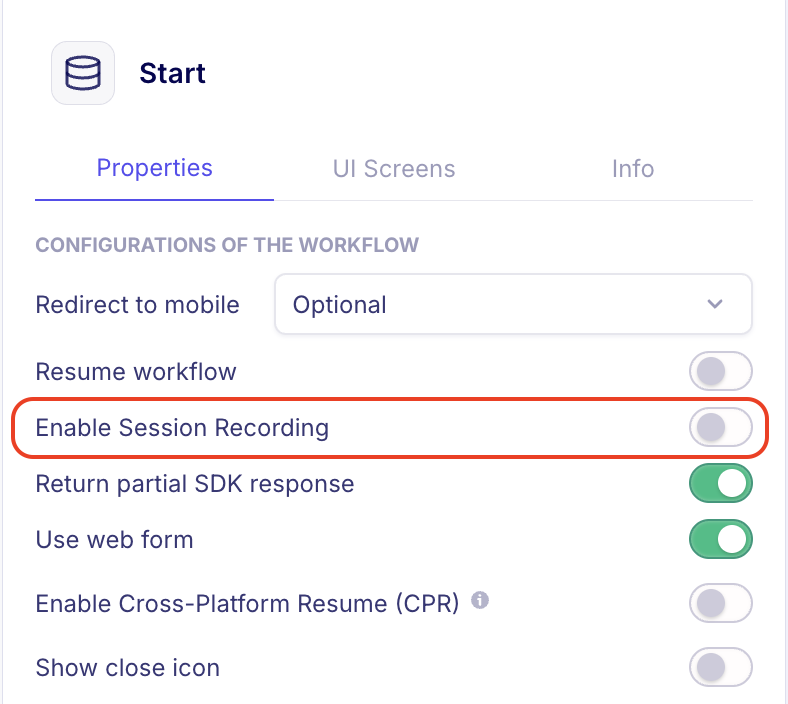
On the Workflow Builder, use the "Enable Session Recording" toggle on the side panel for the 'Start' block:
-
Alternatively, add
enableSessionRecording: trueinside thewebobject underpropertiesin the workflow config JSON.
This enables recording only for internal users — anyone within the HV client account with a HyperVerge email.
Enabling for clients
- Get the appId for which you need to enable session recording
- Raise a request in
#platform-request-channeland wait for approval- Description: "Enable Session Recording for
<appID>" and tag relevant SA members
- Description: "Enable Session Recording for
- Once approved, recordings appear after 15 minutes
The Recordings Tab
- Recordings are on the 'Recordings' tab in the 'Application View' on HVOne dashboard
- Sessions are listed in ascending order, with the latest session shown by default
Controls:
- Space bar — pause/play
- Speed controls — 1x, 2x, 4x, 8x
- "Skip inactive" toggle — automatically skip sections with no activity
- Navigation arrows move between sessions (blue dot indicates hidden sessions)
Limitations:
- Session recording is not available for WebView and mobile SDK capture modules
- For WebView: overlay shows "User in WebView" / "We are unable to capture interactions on WebView"
- If recording is unavailable: overlay shows "Recording Unavailable"
FAQs
Q: Where can I see recordings in the dashboard? A: Under the 'Recordings tab' on the Applications tab of HVOne dashboard.
Q: How long for client config changes to take effect? A: 15 minutes.
Q: Where are recordings stored? Is PII safe? A: Recordings are stored on S3 like all API results. All data security guardrails for PII storage apply.